2018年8月16日 星期四

MySQL Java emoji support

前言

現在只要做 mobile 服務都必須支援 emoji 等表情符號
雖然 AWS Aurora DB 已經設定好 character set utf8mb4 , utf8mb4_unicode_ci,想說應該這樣就沒問題了,沒想到還是被我踩到 mysql-connector-java library 的地雷

錯誤訊息

class org.springframework.jdbc.UncategorizedSQLException:PreparedStatementCallback; 
uncategorized SQLException for SQL [update example set content = ?, updateDate = sysdate() where id = ?]; 
SQL state [HY000]; error code [1366]; 
Incorrect string value: '\xF0\x9F\x98\x80\xF0\x9F...' for column 'content' at row 1; 
nested exception is java.sql.SQLException: Incorrect string value: '\xF0\x9F\x98\x80\xF0\x9F...' for column 'content' at row 1

解決辦法

很簡單,就是將 mysql-connector-java library 升級到 5.1.13 之後的版本就可以了!!
Connector/J now auto-detects servers configured with character_set_server=utf8mb4 or treats the Java encoding utf-8 passed using characterEncoding=… as utf8mb4 in the SET NAMES= calls it makes when establishing the connection. (Bug #54175)

Reference

2018年8月15日 星期三

How to read request body (ServletInputStream) multiple times

前言

很多時候,我們為了在程式發生錯誤時,能夠有足夠的資訊 debug,所以需要 log body,但偏偏 HttpServletRequest getInputStream 取出一次之後就拿不到了,所以必須想個保留 buffer 的方式。

解決過程

本來是只需要 Override getInputStream() 並保留 byte[] body 當作 buffer,然後回傳 new ServletInputStream 時,Override read() 方法讓它從 byte[] body 拿資料就好了。
但事情並沒有想像的簡單,因為我的專案用的是 Tomcat8,使用的是 servlet-api 3.1.0,所以new ServletInputStream 時必須另外實作 isFinished()isReady()setReadListener(ReadListener readListener) 這些方法。
接著發現,原本 request.getParameter(...) 拿不到東西壞掉了…
好像原本有使用到 getInputStream() 的方法都會拿不到資料,因為我是繼承之後做 wrapper,原本的方法呼叫的是 super.getInputStream,並不是我 override 後的方法,當然拿不到,就像一開始前言說的。
為了解決這個問題,我必須再 override getParameter(String key)getParameterValues(String key)getParameterMap()getReader() 等方法。

完整程式範例


import java.io.BufferedReader;
import java.io.IOException;
import java.io.InputStreamReader;
import java.nio.charset.Charset;
import java.util.Collections;
import java.util.LinkedHashMap;
import java.util.Map;

import javax.servlet.ReadListener;
import javax.servlet.ServletInputStream;
import javax.servlet.http.HttpServletRequest;
import javax.servlet.http.HttpServletRequestWrapper;

import org.apache.commons.io.IOUtils;
import org.apache.http.NameValuePair;
import org.apache.http.client.utils.URLEncodedUtils;
import org.apache.http.entity.ContentType;

import com.google.common.collect.ObjectArrays;

public class BufferHttpServletRequestWrapper extends HttpServletRequestWrapper {
    public static final Charset UTF8_CHARSET = Charset.forName("UTF-8");
    private Map parameterMap;
    private byte[] body;

    public BufferHttpServletRequestWrapper(HttpServletRequest request) throws IOException {
        super(request);

        ServletInputStream in = request.getInputStream();

        if (in != null) {
            body = IOUtils.toByteArray(in);
        }
    }

    @Override
    public BufferedReader getReader() throws IOException {
        return new BufferedReader(new InputStreamReader(getInputStream()));
    }

    @Override
    public ServletInputStream getInputStream() {
        return new ServletInputStream() {

            private int lastIndexRetrieved = -1;
            private ReadListener readListener = null;

            @Override
            public boolean isFinished() {
                return (lastIndexRetrieved == body.length - 1);
            }

            @Override
            public boolean isReady() {
                // This implementation will never block
                // We also never need to call the readListener from this method,
                // as this method will never return false
                return isFinished();
            }

            @Override
            public void setReadListener(ReadListener readListener) {
                this.readListener = readListener;
                if (!isFinished()) {
                    try {
                        readListener.onDataAvailable();
                    } catch (IOException e) {
                        readListener.onError(e);
                    }
                } else {
                    try {
                        readListener.onAllDataRead();
                    } catch (IOException e) {
                        readListener.onError(e);
                    }
                }
            }

            @Override
            public int read() throws IOException {
                int i;
                if (!isFinished()) {
                    i = body[lastIndexRetrieved + 1];
                    lastIndexRetrieved++;
                    if (isFinished() && (readListener != null)) {
                        try {
                            readListener.onAllDataRead();
                        } catch (IOException ex) {
                            readListener.onError(ex);
                            throw ex;
                        }
                    }
                    return i;
                } else {
                    return -1;
                }
            }
        };
    }

    @Override
    public String getParameter(String key) {
        Map parameterMap = getParameterMap();
        String[] values = parameterMap.get(key);
        return values != null && values.length > 0 ? values[0] : null;
    }

    @Override
    public String[] getParameterValues(String key) {
        Map parameterMap = getParameterMap();
        return parameterMap.get(key);
    }

    @Override
    public Map getParameterMap() {
        if (parameterMap == null) {
            Map result = new LinkedHashMap();

            String queryString = getQueryString();
            if (queryString != null) {
                toMap(URLEncodedUtils.parse(queryString, UTF8_CHARSET), result);
            }

            String cts = getContentType();
            if (cts != null) {
                ContentType ct = ContentType.parse(cts);
                if (ct.getMimeType().equals(ContentType.APPLICATION_FORM_URLENCODED.getMimeType())) {
                    try {
                        toMap(URLEncodedUtils.parse(IOUtils.toString(getReader()), UTF8_CHARSET), result);
                    } catch (IOException e) {
                        throw new IllegalStateException(e);
                    }
                }
            }
            parameterMap = Collections.unmodifiableMap(result);
        }
        return parameterMap;
    }

    public static void toMap(Iterable inputParams, Map toMap) {
        for (NameValuePair e : inputParams) {
            String key = e.getName();
            String value = e.getValue();
            if (toMap.containsKey(key)) {
                String[] newValue = ObjectArrays.concat(toMap.get(key), value);
                toMap.remove(key);
                toMap.put(key, newValue);
            } else {
                toMap.put(key, new String[]{value});
            }
        }
    }

}

後記

後來發現另外一個比較簡單的解法,就是直接用 spring-web 的 util(ContentCachingRequestWrapper)
概念一模一樣…原來人家已經做過的事,我在重造輪子… 囧rz

Reference

2018年3月21日 星期三

Detected both log4j-over-slf4j.jar AND bound slf4j-log4j12.jar on the class path

前言

最近在 Gradle 載入 Gretty Plugin,讓 Project 自帶 Container,但遇到了 dependency conflicts ,錯誤訊息如下
caused by: java.lang.IllegalStateException: Detected both log4j-over-slf4j.jar AND bound slf4j-log4j12.jar on the class path, preempting StackOverflowError. See also http://www.slf4j.org/codes.html#log4jDelegationLoop for more details.
        at org.slf4j.impl.Log4jLoggerFactory.(Log4jLoggerFactory.java:54)
        ... 37 more
gradle dep 看了一下,發現 Project 本身使用了 slf4j-log4j12,而 Gretty Run Tomcat Container 時需要依賴 log4j-over-slf4j,就是這兩個 library 造成 conflicts。

為什麼

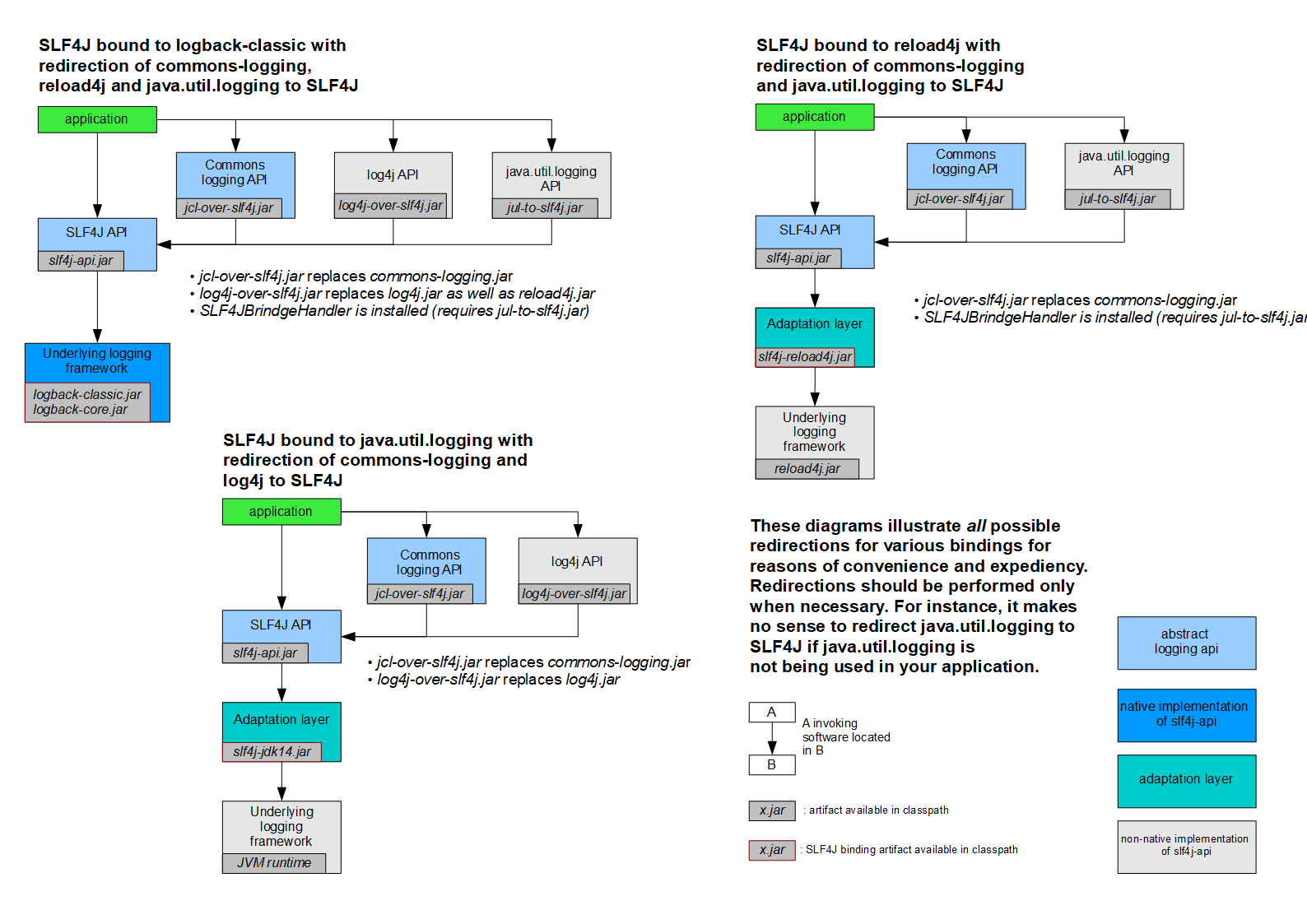
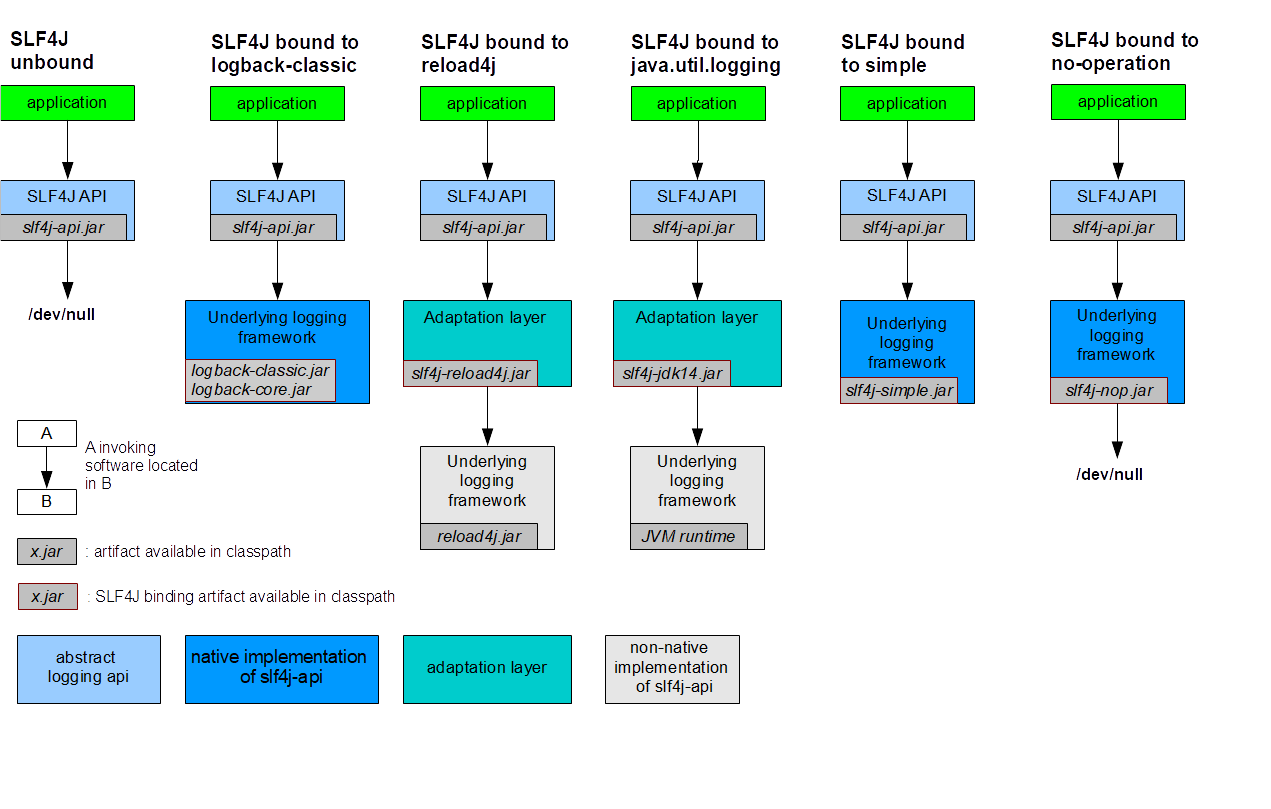
先來看看 slf4j 官網的兩張圖
  • slf4j-log4j12:application 使用的是 slf4j 介面,再透過 adaptation layer 轉由呼叫 log4j framework。
  • log4j-over-slf4j:aplication 使用的是 log4j framework,但可以透過引入這個 library 取代,將原本使用 log4j API 的呼叫轉換至 slf4j 的介面,然後一樣透過 adaptation layer 轉由呼叫除了 log4j 以外的其他 log framework。
這裡有一個唯一的限制,就是不能橋接到相同的 log framework,為了防止 A-to-B.jar 跟 B-to-A.jar 同時出現在 classpath,而導致 A 與 B 一直不停地互相遞迴呼叫,直到發生 StackOverflowError。
SINCE 1.5.11 SLF4J software preempts the inevitable stack overflow error by throwing an exception with details about the actual cause of the problem. This is deemed to be better than leaving the user wondering about the reasons of the StackOverflowError.
…Detail

解法

就像上面解說的,不要讓 classpath 同時出現 log4j-over-slf4j.jar 跟 slf4j-log4j12.jar 就好囉,哈哈,有講跟沒講一樣~XD
好啦,以我自己上面的案例,因為 Gretty Run Tomcat Container 依賴 log4j-over-slf4j,這我沒辦法改,所以要嘛不要使用 Gretty 或改用 Gretty Jetty Container,要嘛改掉自己 Project,俗話說,改變不了環境,只好改變自己適應環境(疑..
解法一:不使用 slf4j-log4j12.jar 改為直接使用 log4j
解法二:使用 providedRuntime。
providedRuntime group: 'org.slf4j', name: 'slf4j-log4j12', version: '1.7.21'

2018年3月19日 星期一

HTTP Client Library

HTTP Client Library

最近因為團隊使用的 Apache HttpClient 3.x 已經是 2007.12 就已經停止維護的項目了,過了十年,也該是尋找下一個工具的時候了,所以我就開始了 Java HTTP Client Library 的研究心得,一開始當然要先了解各自的特色,然後針對每種 Library 寫最單純的 Example Code,最後就是比較表

Introduction

Apache HttpClient

  • Standards based, pure Java, implementation of HTTP versions 1.0 and 1.1
  • Full implementation of all HTTP methods (GET, POST, PUT, DELETE, HEAD, OPTIONS, and TRACE) in an extensible OO framework.
  • Basic, Digest, NTLMv1, NTLMv2, NTLM2 Session, SNPNEGO, Kerberos authentication schemes.
  • Plug-in mechanism for custom authentication schemes.
  • Connection management support for use in multi-threaded applications. Supports setting the maximum total connections as well as the maximum connections per host. Detects and closes stale connections.
  • Response input streams to efficiently read the response body by streaming directly from the socket to the server.
  • The ability to set connection timeouts.
  • Support for HTTP/1.1 response caching.

Square OkHttp

  • HTTP/2 support allows all requests to the same host to share a socket.
  • Connection pooling reduces request latency (if HTTP/2 isn’t available).
  • Transparent GZIP shrinks download sizes.
  • Response caching avoids the network completely for repeat requests.
  • Supports both synchronous blocking calls and async calls with callbacks.
OkHttp supports Java, the minimum requirement is 1.7.

Apache CXF

  • JAX-WS Support
  • Spring Integration
  • Aegis Databinding
  • RESTful Service
  • WS-* Support

Square Retrofit2

  • RESTful Service
  • Support synchronous, asynchronous request

Example Code

為了比較好相互比較,以下盡量會以相同寫法呈現,大致為四個步驟:
  1. New Client
  2. New Method/Request
  3. Call/Execute
  4. Output status code, body, headers

AHC 4.x

HttpClient client = HttpClientBuilder.create().build(); 

HttpGet get = new HttpGet(url);

HttpResponse response = client.execute(get);

System.out.println(response.getStatusLine().getStatusCode());
System.out.println(EntityUtils.toString(response.getEntity()));
System.out.println(response.getAllHeaders());

AHC 3.x

HttpClient client = new HttpClient();

GetMethod method = new GetMethod(url);

try {

    int statusCode = client.executeMethod(method);

    System.out.println(statusCode);
    System.out.println(new String(method.getResponseBody()));
    System.out.println(method.getResponseHeaders());

} finally {
    // Release the connection.
    method.releaseConnection();
}

Okhttp

OkHttpClient client = new OkHttpClient();

Request request = new Request.Builder().url(url).build();

Response response = client.newCall(request).execute();

System.out.println(response.code());
System.out.println(response.body().string());
System.out.println(response.headers().toMultimap());

CXF

UserService userService = JAXRSClientFactory.create(baseAddress, UserService.class, Collections.singletonList(new JacksonJsonProvider()));

Client client = WebClient.client(userService).accept(MediaType.APPLICATION_JSON_TYPE);

Response result = userService.list(0, 10);

System.out.println(client.getResponse().getStatus());
System.out.println(result);
System.out.println(client.getResponse().getHeaders());

Retrofit2

Retrofit retrofit = new Retrofit.Builder().baseUrl(baseUrl).addConverterFactory(GsonConverterFactory.create()).build();

UserService service = retrofit.create(UserService.class);

retrofit2.Response> response = service.list(0, 10).execute();

System.out.println(response.code());
System.out.println(response.body());
System.out.println(response.headers().toMultimap());

Comparison table

HTTP Transport Layer

HttpClient 3.x HttpClient 4.x OkHttp
RESTful Support Basic HTTP Basic HTTP Retrofit
Performance 1 3 2
Easy Use 3 2 1

RESTFul API Layer

  • Encapsulation HTTP Connection Layer
  • REST API Interface Proxy
  • Response Converter
CXF Retrofit
RESTful Support JAX-RS Retrofit Annotation
Performance X O
Easy Use O O+

Conclusion

其實這只是一小部分比較常用的,其他還有很多 Client Library 是沒有時間去了解的,不過經過這次研究,更清楚不同層級 Library 的差異,以及各自專注在不同的職責;從最後的比較表來看,目前在各方面比較好的應該是使用 Okhttp + Retrofit2 吧。

Appendix

official Converter modules

Gson: com.squareup.retrofit:converter-gson
Jackson: com.squareup.retrofit:converter-jackson
Moshi: com.squareup.retrofit:converter-moshi
Protobuf: com.squareup.retrofit:converter-protobuf
Wire: com.squareup.retrofit:converter-wire
Simple XML: com.squareup.retrofit:converter-simplexml

2018年3月6日 星期二

JDK1.6 SSLHandshakeException

前陣子在做安全協定升級,從 HTTP over SSL 升級為 HTTP over TLS v1.1、TLS v1.2。
新服務僅允許使用 TLS v1.2 Protocol ,因為 Google 早在 2014年10月就發布在 SSL 3.0 中發現設計缺陷,建議禁用此一協議。詳情請看 wiki
這時候發現個問題 JDK 各版本對於 TLS Protocols 支援不同,如下表。
JDK 8. (March 2014 to present) JDK 7. (July 2011 to present) JDK 6. (2006 to end of public updates 2013)
TLS Protocols TLSv1.2 (default)、TLSv1.1、TLSv1、SSLv3 TLSv1.2、TLSv1.1、TLSv1 (default)、SSLv3 TLS v1.1(JDK 6 update 111 and above)、TLSv1 (default)、SSLv3
因為 JDK 6 dafault 是 TLSv1,並且不支援 TLS v1.2,除非升級至 JDK 6u121need support contract)。
所以當使用 JDK 6 or 7 的程式要去呼叫使用 HTTP over TLS v1.2 Protocol 的位置時,就會出現以下錯誤
Exception in thread "main" javax.net.ssl.SSLHandshakeException: Remote host closed connection during handshake
       at sun.security.ssl.SSLSocketImpl.readRecord(SSLSocketImpl.java:946)
       at sun.security.ssl.SSLSocketImpl.performInitialHandshake(SSLSocketImpl.java:1312)
       at sun.security.ssl.SSLSocketImpl.startHandshake(SSLSocketImpl.java:1339)
       at sun.security.ssl.SSLSocketImpl.startHandshake(SSLSocketImpl.java:1323)
       at sun.net.www.protocol.https.HttpsClient.afterConnect(HttpsClient.java:563)
       at sun.net.www.protocol.https.AbstractDelegateHttpsURLConnection.connect(AbstractDelegateHttpsURLConnection.java:185)
       at sun.net.www.protocol.http.HttpURLConnection.getOutputStream(HttpURLConnection.java:1091)
       at sun.net.www.protocol.https.HttpsURLConnectionImpl.getOutputStream(HttpsURLConnectionImpl.java:250)
       at com.labcorp.efone.vendor.TestATTConnectivity.main(TestATTConnectivity.java:43)
Caused by: java.io.EOFException: SSL peer shut down incorrectly
       at sun.security.ssl.InputRecord.read(InputRecord.java:482)
       at sun.security.ssl.SSLSocketImpl.readRecord(SSLSocketImpl.java:927)
       ... 8 more
這個錯誤的意思是遠端服務在交握時關閉連線,這個錯在 StackOverflow 也有答案了,參考此
解決方法有幾種:
  1. 啟動服務時,設定 https.protocols 環境變數,讓 JVM 啟動時載入 HttpsURLConnection;-Dhttps.protocols=TLSv1.1,TLSv1.2
  2. 建立連線前,設定 https.protocols 環境變數;System.setProperty("https.protocols", "TLSv1,TLSv1.1,TLSv1.2");
  3. Customizing SSL in HttpClient 3.x
  4. 升級至 JDK 8

Reference material:

2017年12月4日 星期一

計算佔用記憶體


    private static final long MEGABYTE = 1024L * 1024L;

    public static long bytesToMegabytes(long bytes) {
        return bytes / MEGABYTE;
    }

    public static void main(String[] args) throws Exception {
        runGC();

        long start = usedMemory();

        // Do Something ...

        long used = usedMemory() - start;
        System.out.println("Used memory is bytes: " + used);
        System.out.println("Used memory is megabytes: " + bytesToMegabytes(used));
    }

    private static final Runtime s_runtime = Runtime.getRuntime();

    private static long usedMemory() {
        return s_runtime.totalMemory() - s_runtime.freeMemory();
    }

    private static void runGC() throws Exception {
        long usedMem1 = usedMemory(), usedMem2 = Long.MAX_VALUE;
        for (int i = 0; (usedMem1 < usedMem2) && (i < 500); ++i) {
            s_runtime.runFinalization();
            s_runtime.gc();
            Thread.currentThread().yield();
            usedMem2 = usedMem1;
            usedMem1 = usedMemory();
        }
    }

2017年9月27日 星期三

Jackson @JsonFormat.lenient Date validate

前幾天遇到了Jackson convert String to Date 的問題,因為字串轉日期預設是寬容的 ( lenient = true ),所以會在盡量不出錯 ( ParseException ) 的狀況下容錯,但這樣卻會造成資料內容錯誤,例如:輸入字串 "2017-02-29",會輸出 Wed Mar 01 00:00:00 CST 2017

先介紹一下專案環境

  • Jersey2. RESTful Web Service.
  • Swagger. Autogenerate Document.
  • Gradle. Build, Test, Dependent management

build.gralde

compile group: 'org.glassfish.jersey.containers', name: 'jersey-container-servlet-core', version: '2.25.1'
compile group: 'org.glassfish.jersey.ext', name: 'jersey-spring3', version: '2.25.1'
compile group: 'org.glassfish.jersey.media', name: 'jersey-media-json-jackson', version: '2.25.1'
compile group: 'io.swagger', name: 'swagger-core', version: '1.5.13'
compile group: 'io.swagger', name: 'swagger-jersey2-jaxrs', version: '1.5.13'

Solution

@JsonFormat(lenient = false)

可以參考 這裡,簡單來說,這個問題在 2016/11/4 就已經有人提 Issue 出來,並在同年 11/16 就已加入 2.9 版;只要將 jackson-annotations:2.8.5 升級至 2.9.0,@JsonFormat annotation 即可設定 lenient attribute。
但這裡遇到個問題,可以參考 這裡,升版後,會出現以下錯誤;因為 Swagger-core 1.5.13 depends on Jackson 2.8.5. 但 2.9.0 的某個 Method 被拿掉了。(這個問題後來在 Jackson 2.9.1 修復了)
java.lang.NoSuchMethodError: com.fasterxml.jackson.databind.introspect.AnnotatedMember.annotations()Ljava/lang/Iterable;

@JsonDeserialize(using = DateDeserializer.class)

後來考慮到 Jackson 2.9.x 穩定性問題,怕又會有什麼奇怪的錯誤,所以在不升版的情況下,繼承 JsonDeserializer 實作 Date 型態的反序列化,範例如下:
public class DateDeserializer extends JsonDeserializer {

    @Override
    public Date deserialize(JsonParser parser, DeserializationContext ctxt) throws IOException, JsonProcessingException {
        SimpleDateFormat sdf = new SimpleDateFormat("yyyy-MM-dd");
        sdf.setLenient(false);
        String text = parser.getText();
        try {
            Date date = sdf.parse(text);
            return date;
        } catch (ParseException e) {
            throw new RuntimeException("Date Parse 錯誤! 請檢查格式與合法性");
        }
    }

}